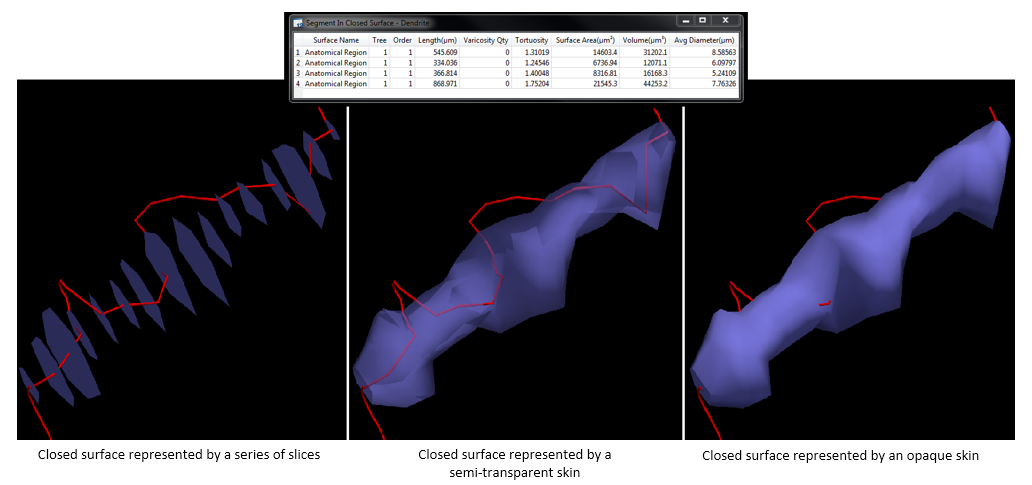
Closed surface
Purpose

|
Use Closed Surface analysis to measure or count structures or portions of structures within a 3D structure generated by adding a skin to closed contours that are aligned in the Z direction. |
Procedure
-
Select the structures you want to analyze.
-
 Click Closed Surface Analysis on the Analyze ribbon.
 In the Closed Surface Analyses dialog that opens, check the boxes to select the analyses you want to run.
-
Click OK to generate the results.
Closed surface analysis can only be performed on closed contours with no loops or non-consecutive duplicate points. 
If surfaces cannot be built, details of why they cannot be built are displayed. You can open the data file in Neurolucida, Neurolucida 360, or Vesselucida 360 and address the issue(s). Frequently, making sure to close all contours and remove any loops will enable Vesselucida Explorer to create surfaces from the data.
Analysis results
In the example below, an axon enters and exits the 3D structure four times. In the "length" column, you can see the length of each part of the axon that is contained within the 3D structure. Number of varicosities, tortuosity, surface area, volume, and average diameter are also reported.