Track workflow > Review and Repair
Review and Repair
Purpose
Use the Review and Repair functions after detection and tracking is complete to correct tracking problems if they have occurred.
Worms panel
Use this panel for reviewing and correcting worm tracks.
 Swap head/tail
Sometimes WormLab incorrectly identifies the head as the tail and vice-versa after a worm emerges from an omega bend or fold. To correct this problem as follows:
- Click a worm to select it.
- Select one of the following:
- Entire track: Swaps the head and tail in all frames for the selected worm.
- To end of track: Swaps the head and tail from the current frame displayed until the end of track for the selected worm.
- Click .
Delete worms
Choose how you want to define the deletion of worm tracks:
-
This frame: Remove all detected worm from the current frame.
-
All frames: Remove all detected worms from all frames.
-
Range: Remove all detected worms from video frame "n" to frame "n+x".
-
on Label: Remove all detected worms from inside a manually drawn label through all frames.
This tool was developed to delete artifacts that are interpreted as worms by WormLab software. Note that the object detected as a worm must remain inside the label for the entire track in order to be deleted.
Join Tracks
To connect the end of a track to the beginning of another track do the following:
- Enter the track numbers to join:
- If the numbers are consecutive, use a dash (1-3).
- If the numbers are not consecutive, use commas.

- Click to join the secondary worm track and the original, primary worm track. The newly created worm track is assigned the original, primary track number.
- Click to reassign worm tracks in consecutive numerical order (and avoid empty columns in data tables).
To connect a track that is interrupted at frame "n" and resumed at frame "n+x" to tracks generated between frame "n" and frame "n+x":
-
Use to "end" the interrupted track 1 at frame "n"
-
Use to connect the interrupted track to the other tracks
Split Tracks
- Use the slider to navigate to the desired frame.
- Click a worm to select its track.
- Click
- WormLab software splits the original (primary) track and creates a new (secondary) track for the worm.
- Click to reassign worm tracks in consecutive numerical order (and avoid empty columns in data tables).
Assign ID
Use to swap the ID number of a selected worm track.
- Use the slider to navigate to the desired frame.
- Click a worm to select it.
- Enter the desired ID number for the worm track.
- Click
Delete selected track
Click a worm then click to delete a worm model and its data. Click to reassign worm tracks in consecutive numerical order (and avoid empty columns in data tables).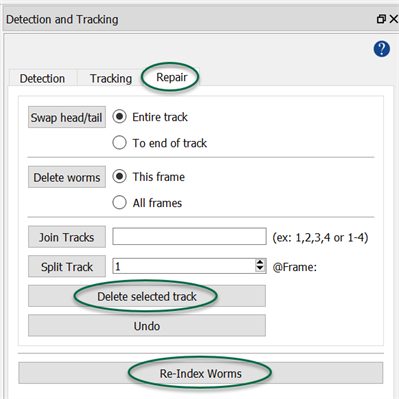
Undo
Click to undo the last operation:
- After deleting a track: Restore the track and the data.
- After joining or splitting: Return to previous state.
Track auto-connect
Click to automatically join discontinuous worm tracks throughout the entire video. Tracks are joined based on the user defined tolerance percentage for position (midpoint shift) and shape (length and width).
Event Tracking
-
Interaction Events: Click and to quickly jump to worm-interactions, including entanglements and self-overlap, throughout the video.
To include coiling as an interaction, check Include coiling.
-
Track event (start/termination): Click and to quickly jump to the beginning and end of worm tracks throughout the entire video.
Re-Index Worms
Click to reassign worm tracks in consecutive numerical order after deleting, joining, or splitting tracks. Re-Indexing worms after modifying the number of worm tracks is a good idea because otherwise, there will be empty columns in data tables corresponding to tracks that are no longer present in the analysis.
About joining and splitting tracks
Sometimes worms overlap each other and WormLab software may not separate them correctly. Depending on your parameters, WormLab might not track a worm in some frames, but will start tracking it again later, either as the same worm or as a new worm. You can correct these problems by joining and splitting tracks.
Custom Objects panel
Use this panel for reviewing and correcting custom object detections and tracking.
If the results contain too many errors to be satisfactory, you can return to the Train workflow and continue training to improve the detector.
Delete objects
Choose how you want to define the deletion of objects:
-
This frame: Remove all detected objects from the current frame.
-
All frames: Remove all detected objects from all frames.
-
Range: Remove all detected objects from video frame "n" to frame "n+x".
-
on Label: Remove all detected objects from inside a manually drawn label through all frames.
Join Tracks
To connect the end of a track to the beginning of another track do the following:
- Enter the track numbers to join:
- If the numbers are consecutive, use a dash (1-3).
- If the numbers are not consecutive, use commas.
- Click to join the secondary object track and the original, primary object track. The newly created object track is assigned the original, primary track number.
To connect a track that is interrupted at frame "n" and resumed at frame "n+x" to tracks generated between frame "n" and frame "n+x":
-
Use to "end" the interrupted track 1 at frame "n"
-
Use to connect the interrupted track to the other tracks
Split Tracks
- Use the slider to navigate to the desired frame.
- Click an object to select its track.
- Click
- WormLab software splits the original (primary) track and creates a new (secondary) track for the object.
Assign ID
Use to swap the ID number of a selected object.
- Use the slider to navigate to the desired frame.
- Click an object to select it.
- Enter the desired ID number for the object.
- Click
Delete selected track
Click an object then click to delete an object model and its data.