Specify the section layout
TissueMaker workflow step 2
The layout will be used across the slides you selected. The default is sequential/variable number of sections per slide/no missing section.
To see the options, check Show advanced ordering options. If there are unusable/missing sections in your original slides, enter the number of slides containing replacement sections in this step.
 Sequential
All sections are ordered sequentially within in the first slide, then within the second slide, and so on.
- If the number of sections varies depending on the slide, select Variable.
- If the number of sections per slide is constant, enter the number of sections in the Sections per slide is field.
Example: Vertical sequential with 3 slides and 4 sections per slide. 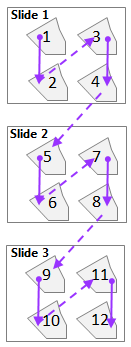
Staggered
Sections are ordered sequentially horizontally or vertically across slides. All slides must contain the same number of sections.
- Enter the number of sections for each slide in the Sections per slide is field.
Example: Vertical staggering with 3 slides and 4 sections per slide. 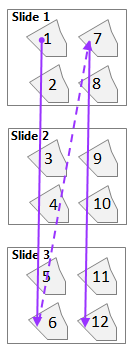
Slides for missing sections
Enter the number of slides containing replacement sections. You need to add these slides at step 1.